
One Message, Two Meanings – What Is Your Data Visualization Saying?

If you have ever said something carelessly then you have probably been told that “you can catch more flies with honey than vinegar”. This piece of practical wisdom reminds us to think about what we say and how we say it. A single thought can be presented many ways with very different reactions and consequences. Good ideas can be ignored because of poor presentation and bad ideas can get attention simply because of a dynamic presentation (think pyramid schemes or late-night infomercials).

In his book “How to Lie with Statistics“, Darrell Huff  provides some great examples of how seemingly good presentations of statistics can fool readers or exaggerate weak findings (bad idea). In each of these examples, the “lying” either creates or takes advantage of a disconnect between statistics and their perceived meaning. It is important to keep in mind that not every statistical lie is intentional or malicious. In many cases it is a result of oversight, a lack of consideration or having enough time to adequately reflect on the content. In other cases it is a result of a series of bad choices in how to visually represent the data.

Each year in Ontario the Education Quality and Accountability Office (EQAO) administers assessments to students in grades 3, 6, 9 and 10.  In the early 2000’s a target was set by the Ontario Ministry of Education with the goal of 75 per cent of students in grade 6 expected to meet or exceed the provincial standards.  With this target in mind, consider the message and meaning conveyed by following images.

This is great news!  The text indicates that the target set by the Ministry of Education has been met.  However, this first picture doesn’t look or feel celebratory. It doesn’t leave you with the feeling “We are doing great!  We have met and exceeded the provincial target!”. Instead, the text appears to be sliding off the page, the percentage is an unpleasant color (in fact the only color in the picture) and the child sits on the dark side of the image with only his frustration and incomplete work illuminated. This picture suggests that 76% isn’t enough even if it is better than the provincial target. It seems to ask “What about the other 24%?”
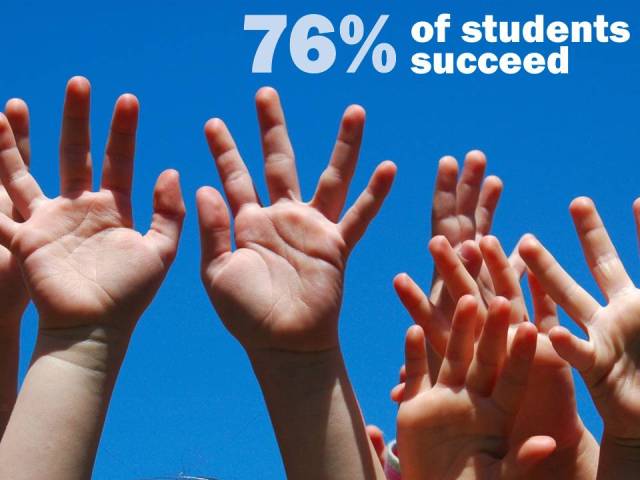
How about this second picture? The sky is clear and blue,  hands are lifted and seem to be pointing to a number that floats high in the air. This image supports and reinforces the message that 76% should be celebrated. That it is an achievable goal.

Although these pictures have the same message (76% of students are successful) and use the same font to convey that message, the images, colors and orientations deliver very different meanings. Researchers may not deal with photographs or advertising messages but we do develop visualizations of data. Unfortunately, a great deal of the way data is presented in research is determined by software default settings. The worst of the offenders are the plots that take advantage of pretty features (think sparkly, shiny 3D Excel pie charts).

Many things can be learned from advertising which uses novelty and humour to catch peoples’ attention and stake a claim in peoples’ memory. I am not suggesting that we start embedding jokes and punch lines into reports.  However, I am suggesting that introducing elements of novelty could do much of the heavy lifting when it comes to attracting, engaging and being memorable in the minds of stakeholders.

Most of the ways we graphically present data (bar charts, line charts, pie charts) were developed in the 1800’s and remain largely unchanged. It is time for Education Research to better leverage the computing and graphical power we have access to. What would education data look like using visual modelling from the field of genetics? How do engineers visualize processes and could they be adapted to describing how students move through our systems and institutions? With a greater capacity to process and graphically present data we need to make sure that we consider the messages that are being conveyed not only in our written text but also in our data visualizations.

In upcoming posts I will explore these considerations and provide examples using publicly avaiable data from education organizations/institutions in Ontario.


Posted in Data Visualization | Tagged , , , | 1 Comment

The iClassroom? A Resource for Implementing Mobile Technology in the Classroom

Mobile technology is everywhere. Whether you are in a city or village you will find people listening to mp3’s, texting to friends or updating Facebook pages on their iPhones. People camp out for hours in coffee shops and fast food restaurants to use the free wi-fi to check email, watch a show or conduct business. But what about the classroom?

Most schools in Ontario have rules that prohibit students from using their cellphones or other mobile technology on school property. Instead of banning the use of this technology, is it possible to incorporate it into classrooms? When you begin to consider this it is easy to identify a lot of challenges which include student access to technology (not every family can afford an iPhone), access to wi-fi (not every school is equipped with sufficient access) and security (imagine managing all the computers in a school as well as every student’s iTouch or iPad).

The iPod User Group (Canby School District from Oregon) hosts a blog that is open to the public and explores all of these issues within the context of K-12.  Members in this group post blogs of their action research projects, classroom activities and share their experiences supporting academic achievement for students with iPods and iPads. 

The discussions and articles are very practical with detailed instructions and screenshots to help explain and troubleshoot challenges. Are you wondering how you would physically manage all of the iPods in a classroom? Check out the article “Building iPad Sync Carts: DIY & MacGyver“. Curious about the connection between curriculum and mobile technology? Read how you can use “Voice Memos and Smart Playlists for Reading Fluency and Assessment“. Better yet, take a look at how Grade 6 Math Teacher Gale Hipp has implemented a set of iPod touch as math tools in her Innovation Grant Summary.

Posted in Research Resources | Tagged , , | Leave a comment

Two Ontario Education Research Events You Should Know About

May and June are very busy months for Researchers in Education.  Projects are wrapping up for end-of-school-year reporting, new projects are being proposed/designed for the upcoming school year and networks across Ontario hold conferences and events. Two events that you should know about are the Association of Educational Researchers of Ontario’s (AEROSpring Conference and the Ontario Chapter of the Canadian Evaluation Society’s (CES) Essential Skills Series.

 Spring Conference “Promoting Equity in Education through an Understanding of Diversity”

This year’s spring conference (June 3rd at Black Creek Pioneer Village) explores the issues of equity and diversity and will feature a keynote from Kathleen Gould Lundy from York University. Kathleen authored the book “Teaching Fairly in an Unfair World” and will kick the day off with her reflections on classroom considerations of equity and diversity and how students can be better supported.

Addressing equity and diversity in a one day conference is no small feat when you consider how many different topics and issues could be addressed. Although it is not possible to address every issue, this conference will consider 6 areas of diversity:

    • diversity as aboriginal education
    • ethnicity
    • exceptionality
    • gender
    • linguistics
    • socioeconomics

Essential Skills Series

The Essential Skills Series offered by CES (June 8, 9 and 10 in London Ontario) will be led by Dr. Paul Favaro and explores the foundations of evaluation and assessment.  The workshops conducted over these three days include:

  • Understanding Program Evaluation
  • Building an Evaluation Framework
  • Improving Program Performance
  • Evaluating for Results

Each of these workshops:

“The workshops are designed by the Canadian Evaluation Society to enhance program evaluation skills and promote the professional practice of evaluation across Canada. The workshops provide opportunities for group exercises and discussion. Participant workbooks are provided for each workshop. “

Both of these events are a great opportunity for the Education Researcher in Ontario to expand their skill sets, network with people from other regions and sectors and keep up with current practices and issues in Ontario.

Posted in Research Resources | Tagged , , , , , | Leave a comment

Ontario Education Research To Be Featured at CSSE 2011

Ontario is well represented at this year’s Canadian Society for the Study of Education (CSSE) conference which will be held May 28 to June 1 in Fredericton, New Brunswick. Researchers from across Canada will use this opportunity to present their work and explore the range of current research topics in Education.

This year’s program for the CSSE conference (current as of April 6, 2011) includes 369 presentations, panels and posters that feature Ontario research. University research accounts for the majority of the presentations (362) but there is also representation from the Ontario Ministry of Education (3), Ontario School Boards (3) and the Ontario Education Research Panel (1).

Of all the Ontario Universities represented at CSSE this year, the Ontario Institute for Studies of Education will deliver the greatest number of presentations (82), followed by Queen’s (45), York (40), the UWO (35) and Ottawa (34).

Just like the AERA meeting held earlier this year, the CSSE conference categorizes each of the presentations.  Where AERA organized presentations by topics, the CSSE has organized presentations by Associations. This year, the top five Associations represented by Ontario research are the Canadian Association for Curriculum Studies (CACS = 88), Canadian Committee of Graduate Students in Education (CCGSE= 58), the Canadian Association for Teacher Education (CATE = 54), the Canadian Association of Foundations of Education (CAFE =42) and the Canadian Educational Researchers Association (CERA =30). If you would like to explore the Ontario research in more detail, a spreadsheet containing records for each of the presentations is available here.

Although I will not be able to attend this year’s conference, I look forward to following the discussions and sharing in the resources and presentations that cause a stir with conference participants. If you would like to follow the 2011 CSSE conference as well, join in on Twitter with the hashtag #Congress2011 #Congress11.

Posted in Research Resources | Tagged , , , | Leave a comment

Tips and Tricks – Data Cleaning (SQL Constants and Appending)

It has been a busy week for data cleaning. The data for one project was spread across several different files and formats. It takes a lot of time and patience to reorganize data and it is easy to get lost or spin your wheels at this stage.

To keep things on track I take a modular approach to extracting and aligning data. I divide each step (or small series of steps) into separate queries and then use them to build new queries.  The advantage to this approach is that you both document the methodology (business rules, decisions and criteria) and you create opportunities to see how the data is changing with each business rule or criteria you apply. For example,

Table_Data contains all the data records
Query_1 selects a subgroup from Table_Data
Query_2 joins the query_1 subgroup to another data set or new business rule

This becomes very useful if you are challenged on the accuracy or relevance of the data table. Not only can you show how the data was handled but you can also show how the outcomes change as different criteria and business rules are applied. Any changes you make to the queries iterate through the rest and updates the data table as quickly as you can click on it.

When cleaning data I tend to work in SQL (Structured Query Language) .  SQL is supported in many different software and database systems.  For those who are familiar with SPSS, SQL is similar to the syntax view where you can view the underlying text that describes the actions and sequences that are applied to the data.

One of the things I needed to do with the this week’s data was to extract a small group of records from 4 different years of assessments (contained in 4 different files). To do this I broke the process down into two steps – extraction and aggregation.  First, I created an extraction query for each of the data sets (4). To avoid confusion and accommodate the possibility of aggregating by year, I needed to add a column in each query that would identify the year of the assessment data.  Adding a constant (something I hadn’t done before) is handled in a very straight forward way in the selection line:

SELECT location, group, 2006 AS YEAR, testscore_1, testscore_2

I wanted the constant to appear between the group field and the first testscore field. In this example the constant is the year 2006 and the field will be labelled “Year” in the table.  A query was also created for years 2007, 2008 and 2009.

With the data from all four assessments contained in 4 queries the next step was to create a new table for the aggregated data.  Using “UNION ALL” the records were appended into a single table:

SELECT * FROM qry_Year2006
UNION ALL
SELECT * FROM qry_Year2007
UNION ALL
SELECT * FROM qry_Year2008
UNION ALL
SELECT * FROM qry_Year2009;

In this SQL segment, the * is a wildcard that means “Select all the columns”. It is important to keep in mind that this will only work if all the queries have the same number of columns.  It also assumes that the format (column order, data types) are the same in each query.

While this is far from an efficient approach (I can imagine DBA’s and Computer Science students screaming in horror reading this) it saves a lot of time later when requests come in to modify the construction of the table. What it loses in elegance, it gains in documentation and facilitates reviews (and changes) of methodology.

Posted in Tech Tips | Tagged , , , , , , , | Comments Off on Tips and Tricks – Data Cleaning (SQL Constants and Appending)